takvim
Yapay Zeka Giriş yapGiriş Ücretsiz başlaBaşla
What's new

What changed on takv.im

We write about new features and improvements here, including news for AI assistants (MCP).

New feature AI assistants (MCP)

Cover images for meeting types

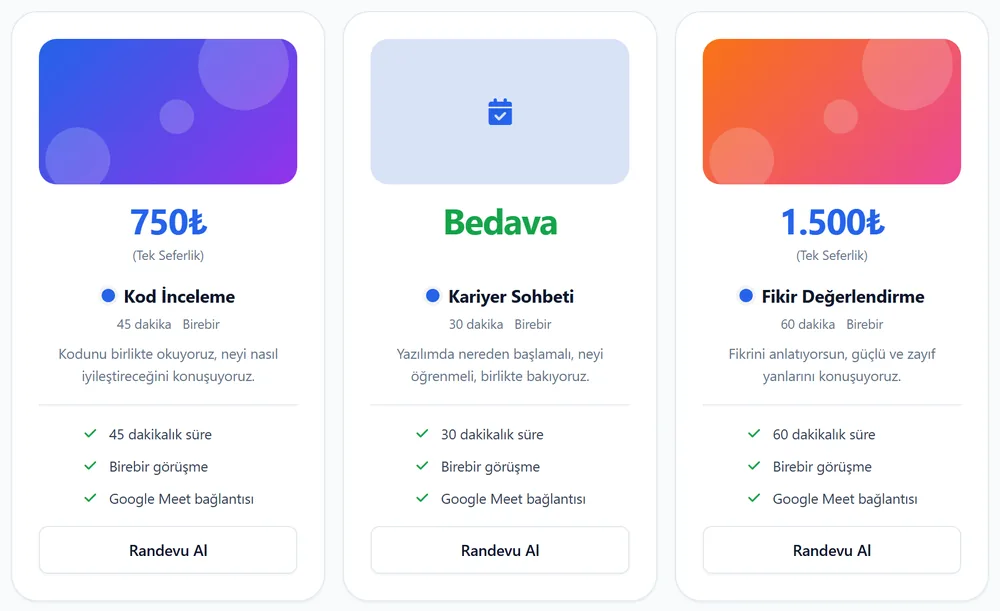
You can add an optional cover image to each meeting type. It shows at the top of the card on your profile and on the booking page.

  • Upload a JPG, PNG or WebP in the "Kapak resmi" (cover image) field while editing a meeting type. Up to 5 MB.
  • The image is resized and saved in a format that loads fast.
  • Your connected AI assistant can add and remove images too.
  • Visitors can report an image that is not appropriate. A reported image stays hidden until it is reviewed.
Three meeting type cards on a profile: two have a colorful cover image, the one without an image shows a light blue area with a calendar icon.

Go to your meeting types

AI assistants (MCP)

Your AI assistant can now manage categories

Tell a connected assistant such as ChatGPT or Claude: "Create a category called Software and put these three meetings in it."

  • Create, rename, describe and delete categories.
  • Reorder categories and meeting types.
  • Move a meeting type into a category.
  • If your assistant does not see the new tools, start a new chat.

Connect your assistant

AI assistants (MCP) New feature

Connect takv.im to your AI assistant

You can connect assistants that support MCP, such as ChatGPT, Claude and Grok, to your takv.im account. Chat with the assistant to look at your customers and to change your profile, meeting types and availability.

  • You choose which permissions to give when you connect.
  • The assistant cannot delete customers, notes or bookings.
  • You can disconnect at any time from the Security section in Settings.
How to connect

RSS addresses
  • All updates in English: https://takv.im/yenilikler.xml?dil=en
  • One month: https://takv.im/yenilikler.xml?dil=en&ay=2026-11
  • One year: https://takv.im/yenilikler.xml?dil=en&yil=2026
  • One day: https://takv.im/yenilikler.xml?dil=en&tarih=2026-11-10
  • A date range: https://takv.im/yenilikler.xml?dil=en&baslangic=2026-11-01&bitis=2026-11-15
  • One topic (yeni, mcp, gelistirici, iyilestirme, gizlilik): https://takv.im/yenilikler.xml?dil=en&etiket=mcp
  • Search by word: https://takv.im/yenilikler.xml?dil=en&ara=category

Join parts with &. There is no limit: every matching update is included. The same parts also work in the address of this page.